SuperCook - Recipe Generator
- 4.6
- Rating
- 1.00M
- Installs
- Free
- Price

 Analysis by App-foxy
I often open the refrigerator with a vague idea of cooking, then discover a few unrelated ingredients, half-used vegetables, and something that needs using soon. SuperCook is built for exactly that moment. It is a free Food & Drink app from SuperCook that turns the ingredients you already have into recipe suggestions, rather than beginning with a dish and sending you shopping for a long list of items.
That difference sounds small, but it changes how I plan meals. Instead of searching for “easy dinner” and hoping I have the right ingredients, I start by recording what is actually in my kitchen. The app then helps me see what those ingredients can become. In my experience, its best quality is not that it magically cooks for me; it reduces the mental work between an untidy pantry and a realistic meal.
It is available at no cost, has an Everyone content rating, and has reached over a million installs. Its average rating is 4.7 from around eighteen thousand ratings, which suggests that the basic idea connects with many home cooks. I would still treat those figures as a starting point rather than a guarantee, because the usefulness depends heavily on how carefully I enter ingredients and how flexible I am with recipes.
You May Also Like

 Blood Strike: 2.5 Anniversary
Blood Strike’s Loadouts Turn Every Drop Into a Tactical Gamble
A close look at Blood Strike’s custom loadouts: how fast access to signature weapons reshapes its battle royale rhythm, rewards preparation, and narrows the gap between fights.

 Pandora - Music & Podcasts
Pandora’s Music Is Easy to Start, but Harder to Recover
Pandora’s strength is its low-effort path from a seed to a station. Its weak spot is how much confidence it asks you to place in connection, setup, and quiet recovery.

 8 Ball Pool
 Is Built on Rivalries, Rematches, and Routine
A close look at the rivalries, rematches, shared routines, and unanswered safety questions that turn a quick pool match into a persistent mobile community.

 Samsung Music
’s Quiet Strength Is Playing What You Already Own
Its reach comes less from spectacle than from dependable access to a personal library. That simplicity is both the app’s strongest retention engine and its ceiling.

 AccuWeather: Weather Radar
AccuWeather Review: A Quick, Clear Forecast for Everyday Decisions
For everyday plans, the best forecast is the one you can understand quickly. AccuWeather makes rain timing, radar, and local conditions easy to act on, with a few trade-offs.

 Hill Climb Racing
Why Hill Climb Racing Still Turns Crashes Into One More Run
A tiny car, a bumpy hill and one more upgrade: Hill Climb Racing keeps resurfacing because its simple chaos makes every near-miss feel personal.
More From Our News Desk
View All News


How SuperCook turns kitchen leftovers into meal ideas
I find the most useful way to approach SuperCook is as a quick kitchen audit: start with the ingredients you want to use soon, then add the staples that make a meal possible. That keeps the search grounded without turning inventory upkeep into a chore. From there, I can judge whether a suggestion is genuinely convenient or merely close, which leads to the practical question of where ingredient matching helps—and where it still needs my judgment.
Starting with ingredients instead of recipes
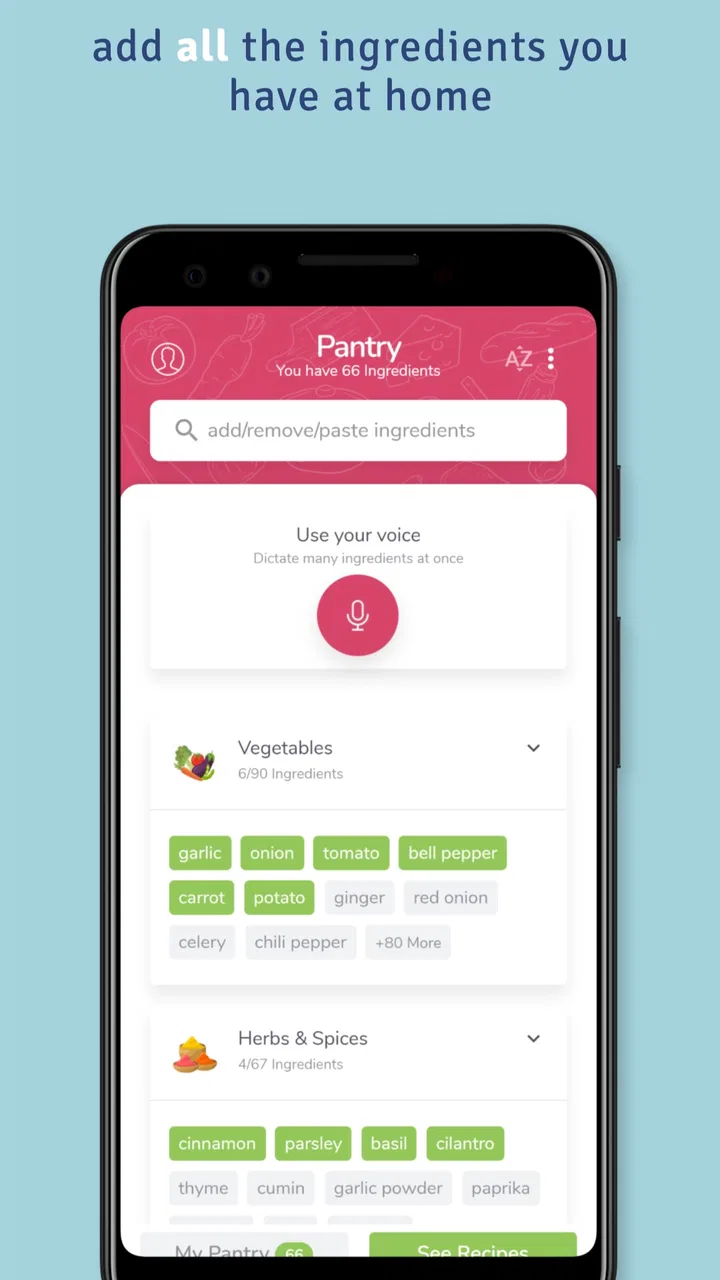
The central workflow is refreshingly practical. I tell the app what I have, and it searches from that starting point. This is more useful than a conventional recipe app when I am trying to avoid an unnecessary grocery trip. A standard recipe search usually assumes I already know what I want to prepare. SuperCook works in the opposite direction: it helps me decide what is possible before I commit to a dish.
That makes it particularly suitable for ingredients that do not naturally suggest a complete meal. A can of beans, a few eggs, rice, a pepper, and some cheese may not look like a plan when they are listed separately. Once entered, however, they can point me toward several kinds of dishes. The app gives those isolated items context, which is where much of its value lies.
I also find the ingredient-first approach useful for reducing food waste. It encourages me to use the spinach, herbs, vegetables, or opened ingredients I might otherwise forget. The important habit is to add items before they become urgent. If I wait until I am already hungry, I am more likely to choose the first familiar meal and ignore the less obvious ingredients waiting in the refrigerator.
A realistic weeknight example
Imagine getting home late with pasta, canned tomatoes, an onion, garlic, a small amount of cream, and a vegetable that needs using. I could search individually for pasta recipes, but that might produce dishes requiring ingredients I do not have. With SuperCook, I can enter the available items and look for recipes that match the actual contents of my kitchen. I then compare the suggestions with my time, equipment, and appetite.
The useful part is not simply finding one recipe. It is seeing which ingredient combinations are already workable and which missing item would make the biggest difference. If several suggestions depend on one additional ingredient, I can make a focused shopping decision instead of buying an entire recipe list. That is a more economical workflow than browsing attractive dishes first and discovering later that the basket is expensive.
There is also a good use case for cooking at the end of the week. I can enter the ingredients that are closest to their use-by point, then prioritize recipes containing them. This does require judgment: the app can help organize possibilities, but I still need to check freshness and decide whether an ingredient is suitable to eat.
Why the ingredient list needs thoughtful input
The quality of the results is tied to the quality of the kitchen inventory. If I enter only “vegetables,” the suggestions will naturally be less useful than if I identify the actual vegetables. The same applies to staples. Recording rice, flour, stock, spices, or cooking fats can make the difference between a recipe that is genuinely available and one that looks close but still requires a shopping trip.
My practical tip is to build the list in two passes. First, add the main ingredients I want to use. Then add the quiet staples that I normally take for granted. After that, I can inspect the recipes and remove anything I no longer have. This is faster than trying to create a perfect inventory in one session, and it keeps the search focused on what matters for tonight.
A second useful habit is to think in substitutions before rejecting a result. A recipe may call for one type of onion, bean, herb, or cheese while I have another. SuperCook can surface the direction, but it cannot replace my cooking judgment. For confident cooks, this makes the app more flexible. For beginners, it means the most promising result may still need a quick check against a trusted cooking reference.
What the app does better than ordinary recipe browsing
Traditional recipe collections are excellent when I want inspiration, a familiar cuisine, or a carefully explained technique. Their weakness is that they often encourage aspiration rather than practicality. A beautiful recipe can be completely unhelpful when I am missing three important ingredients. SuperCook is stronger at the “what can I make now?” question.
It also changes the way I evaluate a recipe. Instead of judging only by its photograph or title, I can consider how much of it is already covered by my pantry. That makes the choice more grounded. A slightly less exciting dish that uses nearly everything I own may be the better meal than a more elaborate option requiring a special shopping trip.
On the other hand, a conventional recipe app may be preferable when I need detailed culinary instruction, a specific dietary plan, a fixed serving structure, or a highly polished cooking lesson. SuperCook’s ingredient-matching concept is the reason to use it, but it is not automatically a substitute for every kind of recipe resource.
Value when the app is free
The cost question is straightforward: SuperCook is free to use. That gives it a low-risk role in my kitchen. I do not need to justify a purchase before testing whether the ingredient-first method fits my habits, and I can keep it available for those evenings when planning feels harder than cooking.
Free access matters here because the app is most useful as a practical utility, not necessarily as the only place I learn recipes. I can use it to discover a direction, decide what to cook, and then rely on my own experience or another cooking source for technique when needed. Since there is no purchase cost to weigh against that occasional benefit, even a few successful “use what I have” meals can make the experiment worthwhile.
I would not describe free access as unlimited value for every cook. Someone who already plans weekly menus, keeps a carefully organized pantry, and enjoys selecting recipes in advance may gain less from an ingredient-matching tool. In that case, the app may be an occasional backup rather than a daily companion. Its value comes from solving a specific planning problem, not from replacing every cooking habit.
Where the experience can feel less precise
The first trade-off is that ingredient matching does not remove the need to read. A recipe can match the items I entered while still depending on quantities, cooking tools, preparation time, or pantry basics that I have not considered. I need to open the recipe, inspect the instructions, and decide whether the result is realistic for me. A matching result is a lead, not a promise that dinner is ready to assemble.
The second trade-off is discovery versus control. If I know exactly what I want, browsing by ingredient can feel like an extra step. I may spend time entering ingredients when a direct search for a familiar dish would be quicker. The app earns its place when I am flexible about the final meal. It is less compelling when I already have a precise recipe in mind.
There is also a risk of entering too many ingredients and creating a noisy search. My best results come from treating the list as a current cooking inventory, not as a permanent record of every item I might own. If the list becomes outdated, the suggestions become less trustworthy. A short cleanup before searching is a small task, but it has a noticeable effect on the usefulness of the results.
Questions I would ask before relying on it
One common question is whether it is suitable for beginners. I think it can be, especially for someone who wants help choosing a dish from familiar ingredients. The beginner still needs to read instructions carefully and understand basic food-safety decisions, but the app lowers the intimidating blank-page problem. It gives a starting point without requiring a complete meal plan beforehand.
Another question is whether it works for strict dietary needs. I would use it cautiously in that situation. Ingredient matching can help me begin a search, but I would personally verify every ingredient, substitution, label, and preparation detail before cooking for an allergy or a medically required diet. A recipe that appears compatible may still contain a detail that matters to a particular person.
It is also worth asking whether the app is useful without a full pantry inventory. Yes, but with reduced precision. I can begin with the ingredients I most want to use and gradually add the basics. That partial approach is often enough to uncover ideas, though I should not assume that a result uses only the items I remembered entering.
For people cooking for a family, the app can help with variety, but it does not solve preference conflicts. I may find several recipes that use the same ingredients, yet none may suit every person at the table. I still need to consider portions, dislikes, preparation time, and whether the meal is appropriate for the group. The app supports the decision; it does not make the household decision for me.
Who will get the most from it
I see the strongest fit among people who buy ingredients without a complete plan, cook irregularly, or want to waste less food. Students, busy households, and anyone trying to stretch a grocery shop can use the app as a bridge between available ingredients and a plausible meal. It is especially helpful when I have enough food to cook but not enough imagination to combine it.
It can also benefit adventurous cooks who enjoy being given a direction rather than following a fixed menu. Entering one unusual ingredient and seeing what pairs with it can lead to meals I would not have searched for directly. The experience feels more like solving a kitchen puzzle than scrolling through a recipe magazine.
I would recommend skipping it, or using it only occasionally, if I want a structured meal planner, detailed nutritional tracking, or highly guided cooking lessons. Those needs call for tools designed around schedules, nutrition, or instruction rather than ingredient availability. SuperCook is at its best when the question is practical and immediate: what can I make from what is already here?
My workflow for getting better results
I would begin by entering the ingredients that are most urgent, then include the staples that make a dish feasible. Next, I would scan several results instead of choosing the first one. This helps me compare the amount of extra shopping required, the cooking effort, and whether the recipe uses the ingredient I most want to save.
When a result looks close but not perfect, I would separate essential ingredients from flexible ones. Missing a central component may make the dish unsuitable, while a different herb or vegetable may be an easy adjustment. This simple distinction prevents me from rejecting useful suggestions too quickly, while also preventing unrealistic substitutions.
Finally, I would update the inventory after cooking. Removing used items and adding new purchases keeps future searches honest. That small maintenance step is one of the least exciting parts of using the app, but it is also one of the most important. An ingredient-based tool cannot be more accurate than the list it is given.
My verdict on the free download
SuperCook is a focused, sensible Food & Drink app that solves a real everyday problem. I like it because it starts with my kitchen rather than an idealized shopping list. The free price makes it easy to try, and the Everyone rating makes it approachable for a broad household audience. SuperCook, the developer, has kept the concept clear: ingredients first, recipe ideas second.
The app is not a replacement for cooking knowledge, careful ingredient checking, or a detailed meal-planning system. Its suggestions still require judgment, its usefulness depends on maintaining an accurate ingredient list, and direct recipe search can be faster when I already know what I want. Those are meaningful limitations, but they are also reasonable boundaries for this kind of tool.
It runs on Android seven and later, and the current version is 2.0.29.1. With over a million installs, it has clearly found an audience, while the strong average rating indicates that many users appreciate the basic workflow. I would recommend trying it if your usual dinner problem is not “I have no food,” but “I have food and no plan.”
My final recommendation is to download it if you want a low-cost way to make pantry cooking more deliberate. I would use it as a discovery and decision tool, then apply my own judgment to the recipe and substitutions. If you prefer fixed menus, advanced nutrition controls, or step-by-step culinary training, another category of app may serve you better. For turning scattered ingredients into realistic possibilities, however, SuperCook is a genuinely useful companion.
FAQs for SuperCook - Recipe Generator
01What is SuperCook and how does it work?
SuperCook is a recipe generator app that helps you make the most out of the ingredients you have at home. By inputting the items you already have in your pantry, the app suggests a wide range of recipes you can create. It effectively reduces food waste and helps you discover new dishes without needing to purchase additional groceries.
02Is SuperCook available for both Android and iOS devices?
Yes, SuperCook is available for download on both Android and iOS platforms. The app can be found on the Google Play Store for Android users and the Apple App Store for iOS users, ensuring a wide accessibility for different smartphone users. It’s designed to be user-friendly and compatible with most devices.
03Does SuperCook require an internet connection to function?
SuperCook does require an internet connection to fully function, as it needs to access its extensive database of recipes and ingredient information. While you can explore some features offline, you’ll need to be connected to the internet to get the most accurate and up-to-date recipe suggestions based on your pantry items.
04Are there any in-app purchases or subscription fees in SuperCook?
SuperCook is free to download and use. While the app offers a wide range of features without any charges, there may be optional in-app purchases or ads to support the developers. However, these are not necessary to access the core functionalities of the app, making it accessible to all users.
05How can SuperCook help with dietary restrictions or preferences?
SuperCook allows users to personalize their experience by setting dietary preferences and restrictions. Whether you’re vegetarian, vegan, gluten-free, or have specific allergies, the app can filter recipes to match your needs. This customization ensures that you only receive recipe suggestions that align with your dietary lifestyle.
Pros
- Intuitive interface enhances user experience.
- Supports multiple dietary preferences.
- Large database of diverse recipes.
- Helps reduce food waste effectively.
- Easy-to-use ingredient search feature.
Cons
- Limited offline functionality.
- Occasional duplicate recipe listings.
- Some recipes lack detailed instructions.
- Ads can interrupt the user experience.
- Limited customization for saved recipes.

SuperCook - Recipe Generator
Gallery